
Imagine Red Review
An adult AI image and video generator built around a public feed, with 30 image models, four video models, 20 free images a day, and credits from $7.90.
Imagine Red is an adult AI generator with separate Image, Video, and Modify tabs, a public feed of community creations, and an API. The supplied review counts 30 image models and four video models, 20 free image generations a day in a slower queue, and paid credits or subscriptions for faster output, video, and watermark-free downloads. We did not generate anything ourselves.
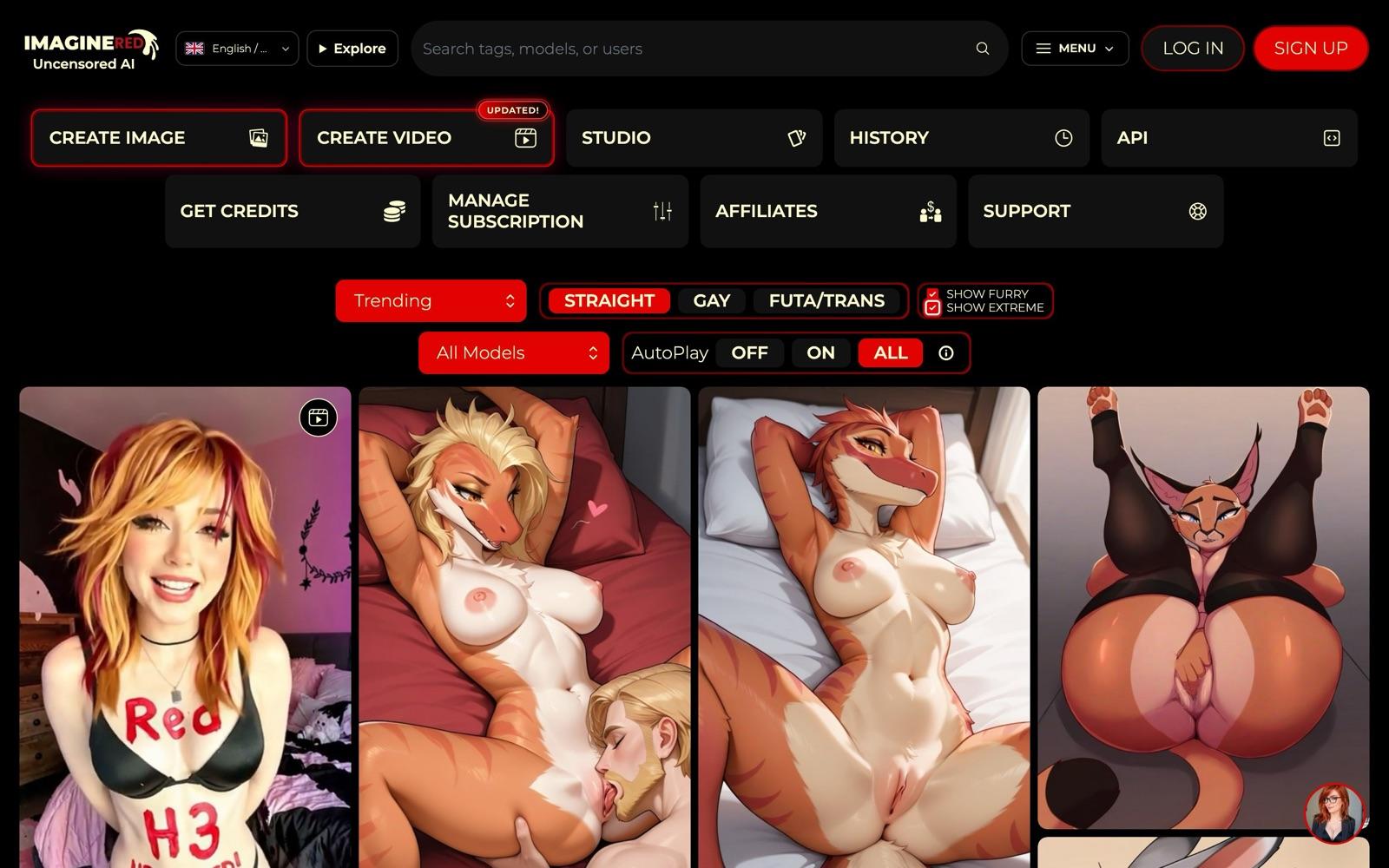
About this review: rewritten from the supplied Imagine Red review export (November 2026). Model names, credit costs, and plan details come from that export and its homepage screenshot. We did not generate images or videos, or buy credits ourselves.
What is Imagine Red?
Imagine Red describes itself simply as Uncensored AI. It combines a generator with a public feed, and the feed is the first thing you see: at the time of the supplied review it held 13,185 public image creations and 2,699 public videos. Each post shows the creator's handle, likes, a follow button, and the full tag string the model used, so other people can see how a result was made and reuse the idea.
Creating anything through the website requires an account. The exception is the API, which can be paid for through an x402 wallet with no account at all. Generation is split into three tabs: Image for new pictures, Video for clips, and Modify for editing existing images with its own list of models.
The site lists 30 image models and four video models. Named examples include Kreate Red, presented as its newest adult image model with native Quad-HD output and support for editing and reference images; Red Image for fast, realistic results; Illustrious for anime; and Fur for furry art. On the video side the source names RED H3 (a fine-tuned model based on MiniMax H3), RED Video XL with experimental audio, WAN Spicy 2.7 with audio and speech up to 15 seconds, and the cheaper original RED Video.
The feed can be sorted by Trending and filtered by orientation (Straight, Gay, or Futa/Trans), with separate Show Furry and Show Extreme toggles and an AutoPlay switch for videos. The supplied screenshot shows these controls above the feed, alongside buttons for Studio, History, API, Get Credits, Manage Subscription, Affiliates, and Support.
What holds up. What’s missing.
Pros
A daily free allowance
Free accounts get 20 image generations a day. They run in a slower queue and carry a watermark, but they cost nothing.
A wide choice of models
The site lists 30 image and four video models, covering photorealistic, anime, and furry styles, plus a separate Modify tab for editing.
Reference images on the image side
Up to three reference images can guide a generation, and newer models such as Kreate Red are described as built for reference and edit work.
Video with audio options
RED Video XL adds experimental audio, and WAN Spicy 2.7 supports audio and speech in clips up to 15 seconds.
A feed that shows how results were made
Public posts list their full tag strings, so the feed doubles as a library of working prompts.
Credits and plans at many sizes
One-time packs run from 1,000 credits for $7.90 to 100,000 for $499.99, with subscriptions from $7.90 to $112.90 a month.
A full API
The API covers image and video generation, editing, references, and OpenAI-compatible chat, paid with an API key or an x402 wallet.
Cons
No free video
Every video costs credits. The source measured a 15-second Red H3 clip in Enhanced and Quality mode at 390 credits, roughly $3 at the entry rate.
An account is required to generate
There is no anonymous trial on the website. Only the API can be used without an account, through an x402 wallet.
Free output is slow and watermarked
The free queue is advertised at three minutes or longer per job, and removing the watermark is a paid feature.
No refunds
The site states it does not give refunds, citing GPU costs, although subscriptions can be cancelled at any time.
Generations not run by us
Output quality, speed, and anatomy problems are described as the supplied review reports them, not tested by us.
The limits behind the feature list
Image tab
A model or style menu, up to three reference images, a natural-language prompt box, a Premium Mode switch, a batch slider from one to eight images, High Quality or Enhanced Quality resolution, and aspect ratios including 16:9, 1:1, 9:16, and Auto, with more under Show all Aspect Ratios. Advanced Settings and a Recent History panel sit alongside.
Video tab
Choose Original or Enhanced mode, Fast or Quality resolution, Motion Boost, a duration (15 seconds is the prominent option), aspect ratio, and one or two videos per run. Every video uses credits.
Modify tab
A separate tab with its own model list for editing existing images rather than generating new ones. The source links it to the edit and reference abilities of newer models such as Kreate Red.
Red H3 updates
An official changelog in the feed announced an enhanced Red H3 with lower costs, higher quality, faster speeds, uploadable reference video, and the ability to extend existing clips. Maximum video length was temporarily capped at one minute during the rollout.
Premium Mode speed
Free generations wait three minutes or more. Premium Mode, available with a subscription or enough credits, aims to deliver results in under 15 seconds.
Public API
The /api/ page covers image generation and editing, reference images, video from text, images, frames, references, or audio, and OpenAI-compatible chat completions with multimodal input, tool calling, and structured output. API use draws on the same credit balance as the website.
Imagine Red pricing: credits, plans, and video costs
Imagine Red sells one-time credit packs and subscriptions. Packs start at 1,000 credits for $7.90, or $0.79 per 100 credits, and the largest listed pack is 100,000 credits for $499.99, or $0.50 per 100. The site states that 1,000 credits equal 500 image generations or five Red Video generations, though actual costs vary by model, resolution, and options such as Motion Boost or Enhanced mode.
Subscriptions are monthly by default, with 3-month, 6-month, and annual terms. Silver costs $7.90 a month for 1,000 credits, split as 500 Red Image, 500 Anime/Booru, and five Red Video generations. Gold, Platinum, and Red tiers scale up to 20,000 credits a month at $112.90. Every paid tier adds premium models, the priority queue, the option to hide prompts, and watermark removal. The source does not list Gold or Platinum prices.
Video is where costs climb. The supplied review measured a 15-second Red H3 clip in Enhanced and Quality mode at 390 credits, about $3 at the entry pack rate. The site does not offer refunds, citing GPU costs, but subscriptions can be cancelled at any time.
Accounts, the public feed, and refunds
An account for the website, optional anonymity for the API
Web generation needs a login or sign-up before anything runs. The API is the exception: it can be funded with an x402 wallet without creating an account. The supplied review does not describe what the sign-up form asks for.
Sharing to the feed is a choice
Creations land in your history, and you can choose to share them to the public feed, where they show your handle and the full tag string. Paid tiers can hide prompts. The export doesn't name the operator, describe how stored images are handled, or list payment methods, so check the site's own privacy and terms pages before paying.
The verdict on Imagine Red
The platform's strengths are model choice, reference-image support on the image side, video models with audio, and a feed that shows exactly how other people's results were made. The API, with OpenAI-compatible chat and wallet payments, is unusually complete for this category.
The costs are the main thing to plan for. Free images are slow and watermarked, a single high-quality 15-second video can use 390 credits, and unused money is not refunded. Starting with the free daily images and the smallest pack is the sensible way to judge whether the video side is worth it.